
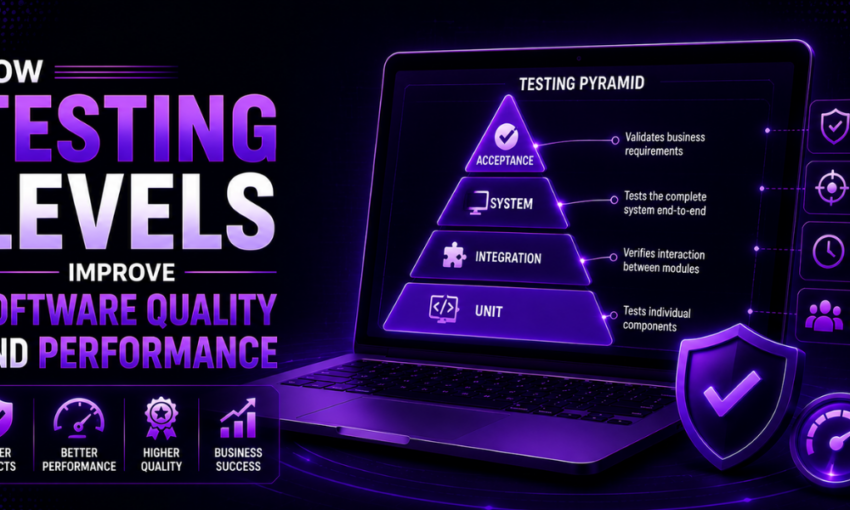
Good software is more than writing clean code. It is also built around checking code at the appropriate times, at appropriate levels and for appropriate reasons. This is where the knowledge of how the testing process moves from small checks in the code to testing the whole product, is important. If teams understand what is testing levels, they can detect the defects at an earlier stage, minimise production problems, and produce top quality software. This will work better on the target platform. In very simple words, a testing level would consist of unit testing, integration testing, system testing, and acceptance testing. Every level defines a role, and when associated together, it creates a more robust quality process. This systematic process helps the developer, tester and business teams to converge on the same objective: having a reliable product that people will trust. It also makes it more efficient to test as it checks for various risks rather than repetitions of the same test in all locations.
What Is Testing Levels in Software Testing?
Understanding the Concept of Testing Levels
Software testing is the criteria that is considered when developers test and declare that a software will work better. To do this, developers engage in good software testing procedures throughout the development life cycle, including individual parts as well as the whole system. Testing Levels are the lower levels that helps to ensure that all aspects of the system are functioning in the correct way.
Why Testing Is Divided Into Different Levels
In software testing, scope of testing gives a proper purpose of the software testing at every step. It helps the testers in working on specific part, save unnecessary work and also verifies the software on a step by step basis. This multiple layers testing is better for communication between teams, and most efficient for quality assurance.
Objectives of Testing at Each Stage
The main goals of software testing in each phase are to detect bugs as early as possible, verify software requirements and ensure the product quality before taking the next step. The entire testing lifecycle has separate levels, with each testing different layers of the system for reduced risk and cost.
How Testing Levels Fit Into Modern Development
These testing methods modernizes development process to:
- Continuous Testing The test suite runs against your commits, pull requests, or release candidates as they come through to catch these bugs much sooner.
- Shift-Right Monitoring: Production Logging & User Monitoring are used to identify unusual problems that pre-production testing may not have detected.
- Automation Balance: Repetitive regression Checks automated, exploratory and usability checks done by people.
Why Testing Levels Are Important in Software Engineering
Developers test individual components of an application themselves to verify that individual units of that application work properly. This saves time in debugging and is cost-effective.
Overview of Software Testing Levels
1. Unit Testing
Developers test individual components of an application on its own to verify that individual units of that application work properly which would save time in debugging and would not be as costly.
2. Integration Testing
Testing team checks communication, data flows and interactions among integrated modules for correctness of interfaces and to fix communication problem between components.
3. System Testing
Testers perform a test of the complete software application in a production-like environment to gain an insight of how the software will perform in actual applications. It ensures that it conforms to the specified functional and non-functional requirements.
4. Acceptance testing
This testing is run by real end-users to ensure the software matches the business requirements. It also considers if it’s ready to be launched and whether customers will accept it.
How Testing Levels Work Together
Tests levels operate in an organized sequence. These types of testing are used by the developers: Unit, Integration, System and Acceptance.
They step from miniscopes of code to the entire product. Each level expands on the previous one in order to diagnose bugs early on in the development cycle, evaluate the communication between the parts and verify the software meets customer requirements.
Testing Levels Flow From Development to Deployment
Test execution flows vertically across the levels of software testing. It starts from the local code construction to the production build by moving through unit, integration, and systems testing stages till acceptance testing stage. This becomes a “quality gate” or checkpoint that make sure the quality is approved to move to next environment.
Unit Testing – The Foundation of Software Quality
Objectives of Unit Testing
Its primary purpose is to verify that the individual units operate properly across all expected and boundary case inputs. It can also be useful for developers to identify logic errors at an earlier stage.
Common Unit Testing Techniques
Black box Testing: The testing is performed on the system based on the input and expected output. The tester would not know the code; tests the system from the perspective of the end user.
White Box Testing: Testing the internal workings, flow of control and coding; verify each code path and statement and all logic and conditions.
Gray Box Testing: Mix black and white box testing; tester knows some information about the internal system; test the functionality and some internal behaviors.
Benefits of Early Defect Detection
Catching problems early is less expensive, quicker, and makes the products better. Solving problems early stops them from getting worse and more costly later.
Integration Testing – Ensuring Components Work Together
Types of Integration Testing Approaches
- Big Bang Integration Testing: Developers bring all modules together at one time and then test it.
- Top-Down Integration Testing: Testers test the upper levels first then lower levels are added one at a time.
- Bottom-Up Integration Testing: Testers test the lower level modules first and move upward to join the modules
- Sandwich Integration Testing: Teams adopt a combination of top-down and bottom-up.
Common Integration Issues Identified
- Component pair recognize incongruence in format data.
- Incorrect calls to the API or compiler errors in interface files.
- Identify missing dependencies or misconfiguration errors.
- The testers report abnormal behavior of modules when they pass data.
Best Practices for Integration Testing
- Teams run tests on interfaces regularly and in the beginning.
- Use of realistic test data and environment by developers.
- Engineers help automate the common integration test cases.
- Clear documentation of error makes debugging faster in case of testers.
System Testing – Evaluating the Complete Application
Functional Validation of the Entire System
Engineers ensure that every function of the application perform as per the documented functionality requirements.
Performance and Security Verification
The team ensures high levels of performance and stability on its platform – whether its’ load-handling capacity, processing efficiency or reliability.
Real-World Usage Scenarios
1. Mobile App Network Instability
When a user does a money transfer and switches from a robust Wi-Fi connection to a slow 3G cellular connection or a moment-lost signal, the system checks for double transactions. It also looks for timeout errors and recovers the states after it comes back online.
2. High Traffic Peak Load event
Thousands of users concurrently login and submit claims for items in very small stock size during a flash sale. They are monitored via response times, server database connection pooling limit, and CPU consumption level, and server stability under the peak load.
Acceptance Testing Process Before Release
User Acceptance Testing (UAT)
Where an end user executes test to check how does it fit to their need and as per need as well as the result achieved.
Business Acceptance Testing (BAT)
Where team performs tests in order to know how does the software supports the business processes to acquire and meets organizational aims and objectives.
Criteria for Final Product Approval
Where team performs tests in order to know if the software conforms to the software agreement in all aspects as specified.
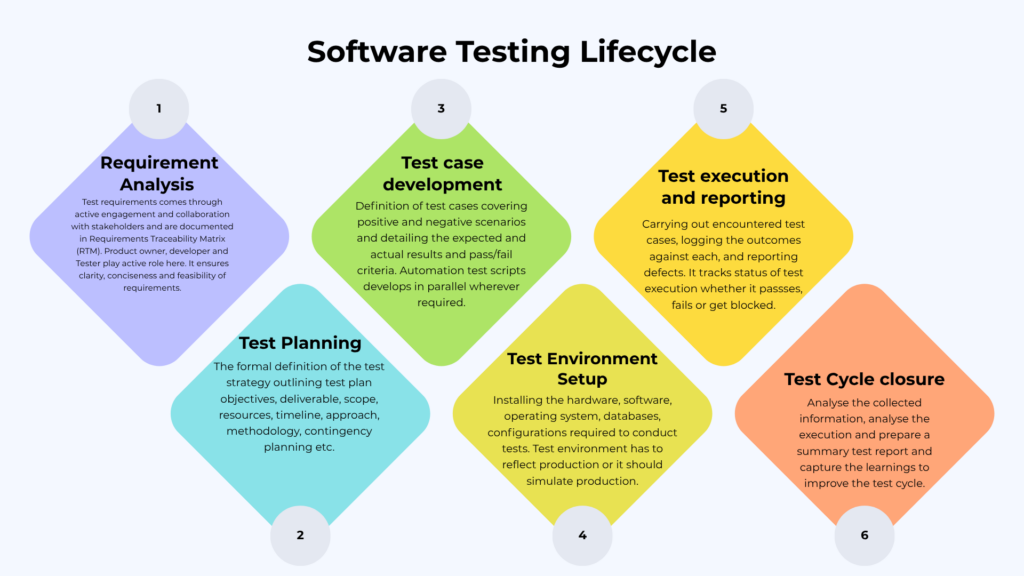
Software Testing Lifecycle
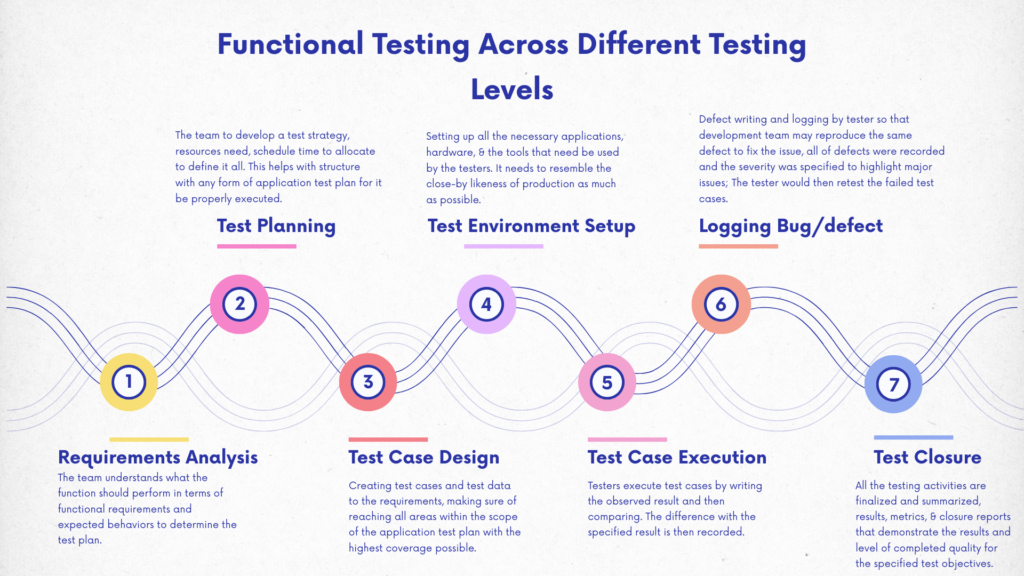
Functional Testing Across Different Testing Levels
Common Defects Found at Each Testing Level
- Non-functional defects: A function is not meeting expectation when performing operation.
- Performance fault: System delays and fails when pressed.
- Faults of usability: Interfaces do not clarify for the user or are difficult to use.
- Compatibility defects: Devices, browser or OS have problems.
- Faults in the security elements: Attackers might exploit the security defects.
- Logical: Formula is incorrect, Calculation: Logic is incorrect
- Misaligned elements: Layout problems or inconsistent designs are seen.
Testing Levels in Agile and DevOps Environments
Agile Testing Quadrants are divided into four quadrants according to the scope and objectives for a particular type of testing is provided for reference below:
- Quadrant 1: It is concerned with technology focused testing such as unit tests.
- Quadrant 2: It addresses functionally oriented business testing.
- Quadrant 3: It focuses on functionally oriented business testing such as exploratory and usability testing.
- Quadrant 4: It addresses technology through analytical testing. Also using testing to critique technology such as with security and performance tests.
Both Agile as well as the DevOps philosophies recognize the benefit of integrating testing early and implementing automation through a practice called continuous quality.
Test Pyramid
The test pyramid is often used to define best practices for early testing and favors a large base and narrowly focused automated tests, as opposed to few fully manual acceptance tests.
Manual vs Automated Testing Across Testing Levels
| Level Number | Testing Level | Primary Approach | Automated Focus | Manual Focus |
| 1 | Unit Testing | Automated | 99% (Functions, methods, classes) | Rare (Debugging individual code blocks) |
| 2 | Integration Testing | Hybrid | API endpoints, data flow, CI/CD pipelines | Complex end-to-end workflows |
| 3 | System Testing | Hybrid | Regression, performance, cross-browser | Exploratory, UI/UX, ad-hoc bugs |
| 4 | Acceptance Testing (UAT) | Manual | Smoke tests, basic business rules | Real-world usability, alpha/beta feedback |
Measuring Success Across Testing Levels
| Success Metric | What It Measures | Why It Matters Across Testing Levels |
| Defect Metrics | Analyzes software quality aspects such as functionality, performance, usability, compatibility, and stability. | Provides an overall view of product quality and helps evaluate the effectiveness of testing at every level. |
| Schedule Adherence | Measures the difference between planned and actual testing schedules and project execution timelines. | Ensures testing activities stay on track and helps identify delays that could affect project delivery. |
| Defect Severity | Classifies defects based on their impact on the software and users. | Helps teams prioritize critical issues and focus on fixing defects that have the greatest impact on software quality. |
| Test Case Efficiency | Evaluates how effectively test cases detect defects in the application. | Indicates the quality of test design and highlights opportunities to improve test effectiveness. |
| Defect Finding Rate | Measures how quickly the testing team identifies defects over a specific period. | Tracks testing productivity and helps assess the effectiveness of defect detection efforts. |
| Defect Fixing Time | Calculates the average time developers take to resolve reported defects. | Measures development responsiveness and helps improve the overall defect resolution process. |
| Test Coverage | Measures the percentage of requirements, features, or code tested. | Ensures all critical functionalities are verified and reduces the risk of untested areas. |
| Defect Cause | Identifies the root causes of defects found during testing. | Helps teams eliminate recurring issues by improving development and testing processes. |
Common Misconceptions About Testing Levels
Misconception 1: The testers are just trying to wreck the software.
Reality: Testing is an assurance function; testers aren’t on the developers’ side and aren’t malicious. Quality testers utilize defined methods and a critical thinking approach to achieve defect prevention, as well as user satisfaction.
Misconception 2: It is that a single size fits all testing is applicable for all projects.
Reality: Testing solutions should be designed in accordance with the nature of the software, its development phases, and standards. There are different techniques to create the different purposes that will ensure that the resources are used efficiently and at a good quality.
Misconception 3: Testing ensures bug-free software.
Reality: No repeated testing is possible due to the iterative development process. Emphasis should not be placed on perfection, but on minimizing high impact defects.
Misconception 4: To test no-code tools is not required.
Reality: Technical skills still needed – you’ll be expected to create test cases, interact with developers, etc. With no-code tools too.
Future Trends in Software Testing Levels
1. Security testing: It incorporates at the development process. Developers are looking at some level of security testing while building software in response to regulations that address software as a source of data breaches. This coverage includes threat modeling, static testing, dynamic testing, and runtime protection.
2. Compliance Automation: Automated compliance testing assures that organizations comply with GDPR, HIPAA, etc. These regulations include data encryption, access controls, and incident handling capabilities.
3. AI in Test Data Management: In test data management AI allows us to create synthetic data, follows privacy norms,reduce Manual operation and ensures data quality.
4. Cloud Testing Platforms: Scalability and collaborative efforts of cloud testing enable teams so that they can allocate resources on demand. They do it to carry out various tests with thousands of device/browser combinations without any physical infrastructure.
5. Accessibility testing: Since every organization is now concerned with accessibility due to legal and ethical concerns, they use automated testing tools to meet WCAG guidelines. They also include accessibility testing in the development process.
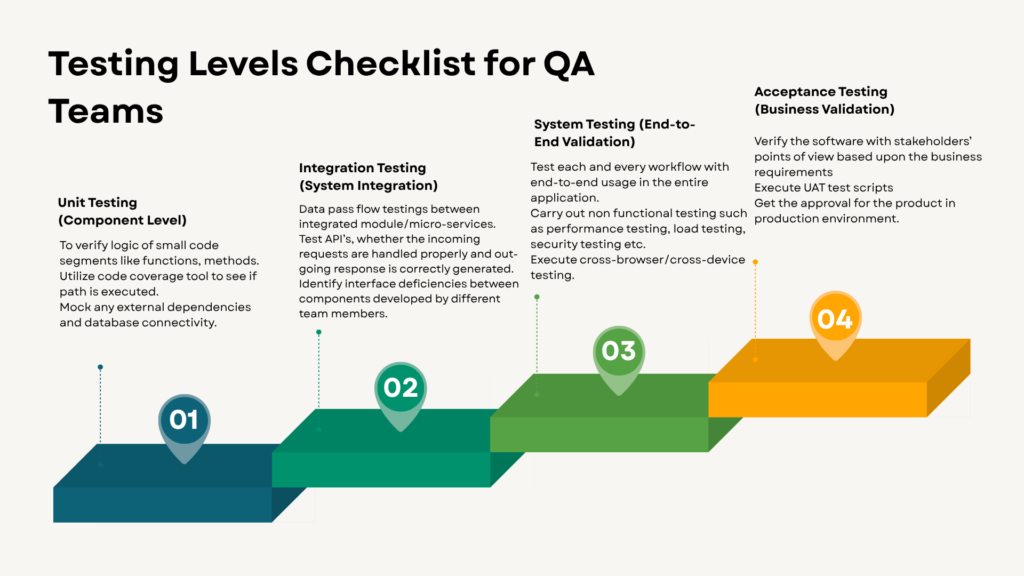
Testing Levels Checklist for QA Teams
Conclusion
Testing levels are a concrete way that software teams can improve software quality and performance during any phase of software development. The combined effects of unit, integration, systems and acceptance testing give results of catching up defects early, risk reduction, and better performing products when used in actual products. In today’s development, what is testing levels not only a theory anymore, it’s the actual groundwork to produce reliable software. It helps developers produce cleaner code, assists testers in uncouth issues, and allows companies to launch with confidence. From idea to deployment, understanding what is testing levels is a better path regardless of the project’s size. Best outcomes appear when teams consider testing to be an ongoing endeavor, rather than a concluding one. That attitude leads to better software, user satisfaction, and reduced surprises on release.
FAQs
Q1. What are testing levels in software testing?
Testing levels determine the specific phases in the Software Development Life Cycle (SDLC) in which developers perform tests.
Q2. What are the four levels of testing?
The software developers perform the four types of software testing levels which are Unit Testing, Integration Testing, System Testing and Acceptance Testing.
Q3. Why are testing levels important in software engineering?
Testing levels are critical to software engineers for early bug detection, cost-efficient software implementation and further for assurance of software reliability.
Q4. What is the difference between unit testing and integration testing?
The key distinction between unit and integration testing is that unit testing checks parts of code individually, while integration testing checks different parts of code or systems together.
Q5. How do testing levels fit into the software testing lifecycle?
Testing levels can embed in the Software Testing Life Cycle (STLC) to plan, design and execute the testing process in scope, strategies and environments.