

When you’ve ever had to change a pricing rule, update a workflow, or modify a business rule without modifying the core code, “soft” coding enters a whole new level of reality. To illustrate simply, simple coding is where developers build their applications such that many strategies, standards and behaviors can be adjusted by settings without requiring rewriting the source. This way, teams can be more responsive, reduce maintenance, and maintain applications more adaptable in the long term. It is particularly helpful when requirements are volatile, rapidly shifting, or the release cycle must be rapid, as it is prevalent today in software environments. In this blog, we will look into what is soft coding, how it functions, where it is utilized and why its utilization helps improve the administration of organizations and its developers.
What Is Soft Coding?
Defining Soft Coding in Software Engineering
Soft coding involves embedding a data object, a setting or a business rule in an external file or database. instead of program’s source code. This would enable the software to adjust its action without running through the same procedure that created the software and start the code over again.
How Soft Coding Differs From Traditional Development Approaches
| Factor | Low-Code Development | Traditional Development |
| Build Method | Relies on visual models and automatically generated code for application development. | Uses line-by-line programming with languages such as Python, Java, or C#. |
| Speed & Delivery | Applications can be developed and launched within weeks due to faster development workflows. | Projects often take months or quarters because of manual coding, architecture design, and testing. |
| User Skill Level | Enables non-IT users, business teams, and citizen developers to build applications with minimal coding knowledge. | Requires experienced software developers with specialized programming and engineering skills. |
| Best for Standard Internal Tools | Ideal for building common internal business applications, workflows, dashboards, and forms quickly. | Provides complete flexibility and fine-grained control for developing complex, large-scale, and highly customized applications. |
The Purpose of Configurable Application Design
A primary concern of soft coded manufacturing is to have software flexible enough to load values from an external file, database, or setting, rather than having them hard coded into the software.
Why Soft Coding Is Important in Modern Applications
Soft coding is important because they give flexibility, easy maintenance and dynamic configuration. It enables the developer to document the values, rules and settings separately from the core of the main program itself. For example, in a file, file repository, a database, or a set of environment variables. Then modify them without a recompilation or rewriting the program.
Understanding Soft Coding in Software Engineering
The Evolution From Static to Configurable Systems
From static to configurable is a shift from a hardcoded, rigid system to a flexible one that’s adaptable. Static Systems: Systems that have fixed parameters; the parameters have to be recompiled if they are changed resulting in high predictability and low scalability. In contrast, configurable application development systems split the concerns to make it possible to configure settings by externalizing them to files or environment variables. With this transition, teams can optimize their software engineering, infrastructure management and application design with real-time updates without coding changes.This saves operational time.
Business Requirements That Drive Soft Coding Adoption
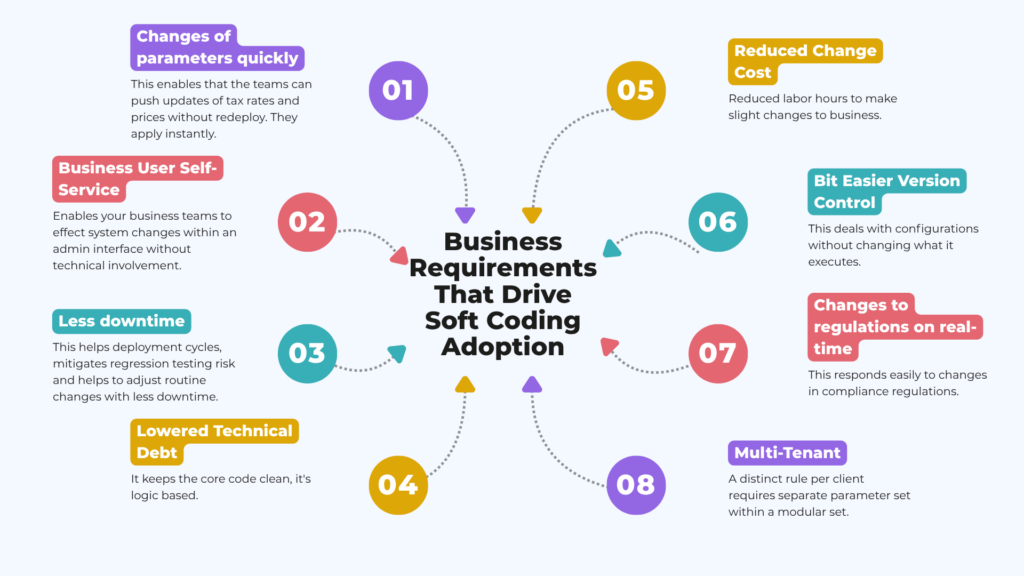
Where Soft Coding Is Commonly Used
- Configuration: Pull server addresses, feature flag statuses, environment-specific directory locations from JSON, YAML, or .env files rather than embedding them in code.
- Business Logic Rules: Pull in information like the applicable discount codes, the local tax rate, or the different user privilege levels. So it can maintain in the database by business users who don’t know how to code.
- Localization and Text: Pull the text shown in your user-facing screens, along with user-facing error message text, into separate language resource files (e.g., to handle other languages).
Key Characteristics of Soft-Coded Applications
- Externalised Configuration – Save your values such as business rules, thresholds, connections and other values in .env, JSON, XML or a separate datastore rather than the source code.
- Runtime Mutability – Your app can alter runtime flow and parameters at run-time and launch time without recompiling your code or to produce a new source-code runnable image.
- User Adjustable – Allow non-technical operators and admins to alter system parameters or fine tune application flags via the app itself (an administrative interface) or a configuration file.
Hard Coding vs Soft Coding – Key Differences
What Is Hard Coding?
When the code source should be changed to alter the behavior it is called hardcoded. Developer cannot set up its logic (hard coded), that is. Hardcoding makes sense to programmers when it seems like the next change will likely call for work changes.
What Is Soft Coding?
Soft coding involves embedding a data object, a setting or a business rule in an external file or database. instead of program’s source code. This would enable the software to adjust its action without running through the same procedure that created the software and start the code over again.
| Aspect | Hard Coding | Soft Coding |
| Flexibility | Low | High |
| Maintenance | Harder | Easier |
| Change Speed | Slow | Fast |
| Development Effort | Lower at the beginning | Higher at the beginning |
| Long-Term Cost | Often higher | Often lower |
How Soft Coding Works in Modern Applications
Storing Rules Outside Source Code
This means a business has external files, databases, or admin screens to manage rules. Your application simply uses those values when running the code. This perfectly demonstrates whysoft codingis the approach for many application setups.
Using Configuration Files and Databases
You might have external property files such as XML, JSON, or YML, these might be your application’s configurations. Businesses could put things such as workflow steps, rules to follow, customer choices etc. In a database, externalizing them through soft code.
Dynamic Parameter Management
This externalization allows developers to define dynamic parameters for things such as, discount thresholds, login logic, or notification rules, and update these without redeploying the application. This capability is highly relevant for business applications.
Runtime Configuration Updates
In some cases, these values can even be updated while the application is running. This type of change reduces downtime, and leads to better responsiveness of business operations.
Dynamic Application Configuration and Its Benefits
- Configurability by environment – Dnamically update the configuration data for an application based on the environment. That means it’s running, e.g. update the data source name (DSN) or API key without rebooting the app).
- Centralised management – It has the ability to manage application configurations in a centralized location. While, also ensuring application consistent configuration across many different environments. As a result, the reduction of “Configuration sprawl”.
- Dedicated focus for developers – Developers just focus on logic, whereas dynamic application configuration takes care of dynamic configurations. Dynamic configuration varies by application settings. This means the application can discover, at the time of its run-up from a known remote store. Static application configurations will usually hold things such as service ports, or application IDs.
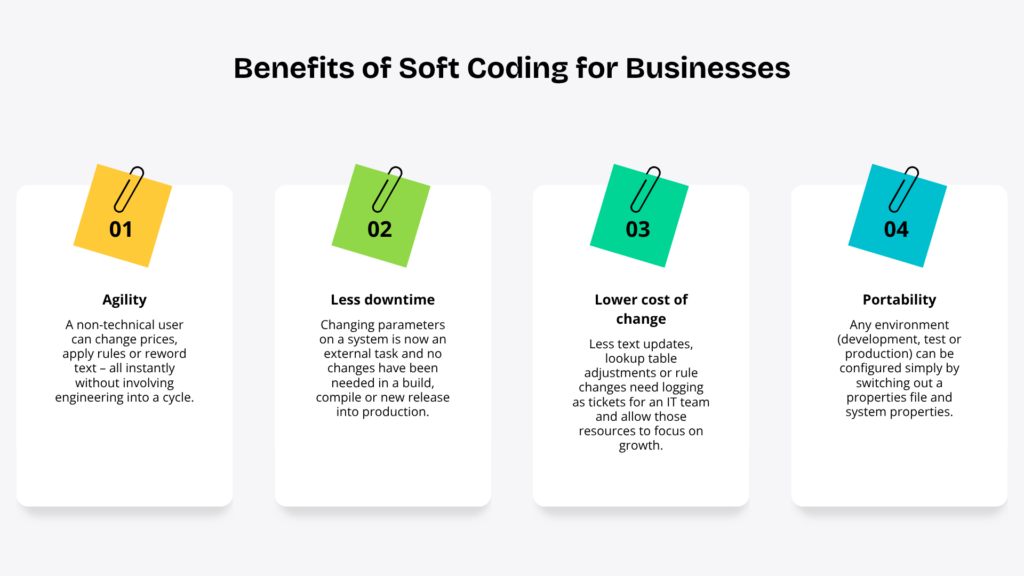
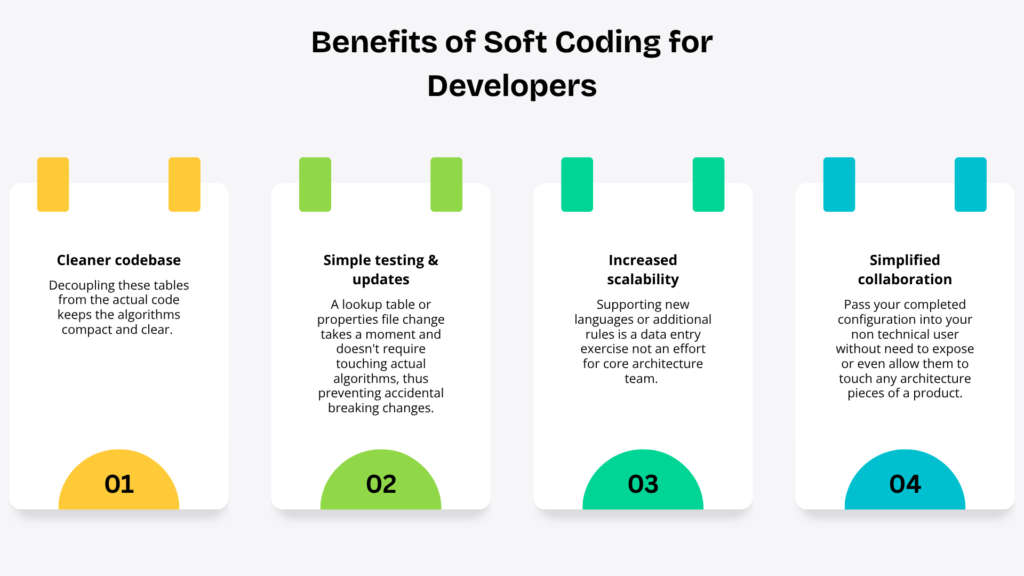
Benefits of Soft Coding for Businesses and Developers
Benefits for the Business
Benefits for the developers
Real-World Examples of Soft Coding
E-Commerce Pricing and Discount Rules
Online stores will regularly update the prices, discounts, or the coupon usage rules via an administration panel to execute quick marketing campaigns. This is typical of soft coding practices.
Workflow Management Systems
Workflows are typically defined through configurable steps, approvals and routing logic. Businesses change their business processes much faster than they usually rewrite the application. This extensibility is characteristic of soft coding.
ERP and CRM Applications
Enterprise customers manage their processes and security by leveraging both CRM or ERP. In general, their needs involve setting up custom data and field level permissions including configuring specific fields or process logic and routing rules. This means different routes based on a field’s value. Soft coding capabilities can accommodate these business requirements very well.
Banking and Financial Applications
A banking or other financial service requires a regulated ability to update configuration elements such as bank customer credit limits, cash transaction limits, and a number of compliance parameters. Soft coding enables regulated updating mechanisms for these business variables.
SaaS Product Configuration Management
Many SaaS platforms offer numerous tenant-, feature-, or plan-level configurability options. Having a system managing configurations of thousands of customers on the same shared instance and given how requirements usually evolve over time. Soft-coding will likely integrate well into the architecture on any scale.
Software Flexibility Techniques Used With Soft Coding
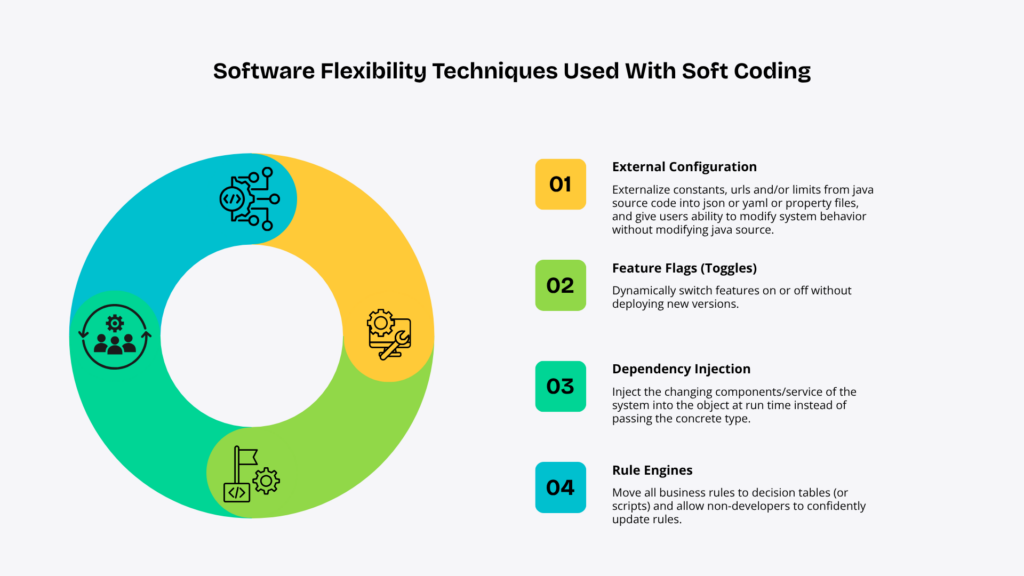
Soft Coding vs Hard Coding – When to Use Each Approach
| Aspect | Hard Coding – When to Use | Soft Coding – When to Use |
| Mathematical Constants | Use for values that never change, such as Pi (3.14159) or fixed mathematical ratios. | Not recommended, as these values are universal and do not require configuration. |
| Core System Rules | Best for algorithms and business logic that are fundamental to the application and should only change through code updates and testing. | Avoid using for critical business logic because frequent runtime changes can introduce errors. |
| Application Structure | Ideal for routing structures, internal data types, method names, and other core programming elements that define the application’s architecture. | Not suitable because these elements are essential to the application’s stability and should remain fixed. |
| Environment Variables | Not recommended, as database connections, API endpoints, and debug settings differ across environments. | Best for configuring database connections, API URLs, and debug settings for development, staging, and production without changing the code. |
| Feature Flags & Configurations | Not suitable because every change would require modifying the code and redeploying the application. | Ideal for enabling or disabling features, running A/B tests, and updating settings at runtime without releasing new software. |
| Multi-Region Support | Not recommended because UI text, languages, and themes vary across regions and users. | Best for dynamically loading localized text, language translations, and themes based on the user’s region or preferences. |
Challenges of Implementing Soft Coding
- Overengineering and level of complexity: The layers of abstracted mapping logic and the inherent system overhead. The developer constructs it to manage every rule and variable, rendering the logic impossible to comprehend and debug.
- Difficult Debugging: It happens when external database determines the control flow by rows or the source code is too deep, making it difficult for engineers to trace.
- Hurdles in deploying and testing: Teams need to synchronize gigantic external states files, mock databases, or complex environment dependencies, only to operate a simple unit test locally or in the staging environment.
- Unmaintainable Systems: Over-softcoded logic can lead to cramming the logic into an overgrown data table or script file. It subverting clean programming code with a brittle undocumented custom DSL (domain-specific language).
- Performance Overhead: Reading and parsing outside inputs to definition may end up being slow and have additional memory overhead versus using the native constant.
Soft Coding in Agile and DevOps Environments
Separate parameters, business rules and settings from source code to files, environment variables, or databases. It is beneficial for Agile and DevOps environments, where teams can make changes to the configuration while running, and deploy the same code into different environments. Key advantages include:
- Support generation of identical build artifacts for runtime variable injection, to support environment agility.
- Support non-technical users of you to change configurations without having to rebuild code for decoupled releases.
- Minimize pipeline friction during sprints with minor changes or an emergency hotfix getting in the way of CI/CD cycles.
Security Considerations in Soft-Coded Applications
| Category | Security Practice | Description |
| Configuration & Injection Risks | Code Injection | Prevent dynamic rules or configurations (such as those rendered by templating engines or eval-like methods) from allowing arbitrary code execution through untrusted user input. |
| Deserialization Vulnerabilities | Avoid loading custom configuration data or soft code from untrusted local files, as this can lead to arbitrary code execution. | |
| Path Traversal | Protect configuration files from file path manipulation through remote interfaces to prevent attackers from reading or replacing critical application settings. | |
| Storage & Access Control | Privilege Separation | Restrict write access to configuration files, environment variables, and data stores to authorized administrative users only. |
| Hardcoded Secrets | Never store API keys, tokens, or database credentials directly in application code or configuration files. Use a dedicated secrets management solution instead. | |
| Integrity Checks | Use cryptographic hashes (such as SHA-512) to verify the integrity of remote configuration files and detect unauthorized modifications. | |
| Validation & Auditability | Rigorous Input Validation | Validate all soft-code configuration values using language-specific rules and constraints before applying them. |
| Hardcoded Secure Defaults | Configure the application to fall back to secure default settings if a soft-code configuration file is missing, corrupted, or inaccessible. | |
| Audit Trail | Automatically record configuration changes, including what was modified, who made the change, and when it occurred, in persistent storage for auditing purposes. |
Common Mistakes Organizations Make With Soft Coding
- Code into Configuration: Very rarely used or overly complex configuration files quickly turn into a poorly documented scripting language.
- No Validations: Raw parameters allow developers to submit invalid values and simply see their applications fall over with a typo.
- Too much abstraction: Adding additional layers on top of configurations that rarely change adds unnecessary architectural complexity. It slows your response times, but with good reason in theory.
- Secrets spread far and wide: It’s far to easy to just throw credentials and PII around and not really secure them.
- Lack of change control: If code review isn’t part of the configuration process you end up managing a series of undocumented application parameterization.
- Network Traffic/Performance Impact: If you have multiple applications in multiple places calling out to network to grab configuration it makes sense to at least be aware that you will incur overhead as a result.
Measuring the Success of Soft Coding Initiatives
Speed and Flow Metrics
* Cycle time: The aggregate effort to turn on an item once it commits until its delivery.
* Lead Time: A metric used to measure all the work needed to deliver the full result, starting with a customer order up to delivering a particular deliverable or project service.
* Deployment frequency: Measure how frequently we deploy to production successfully.
Quality and Stability Metrics
* Change failure rate: Measure the percentage of our deployments to production that result in a degradation of service.
* Mean time to recover (MTTR): Measure how long it takes on average our team to restore service after a production incident or defect.
* Test coverage: Percentage of code exercising with an automated test.
Conclusion
After understanding “what is soft coding“, we can say that soft coding isn’t only a business idea, it is a senseful approach to manage apps that needs regular changes. The separation of rules/setting and core code gives flexibility to teams, decreases maintenance for facilities, and brings swift response to business needs. Understanding what soft coding is, is interesting for software management in the modern era. For enterprises, it enables faster updates, more control over their operations and reduced long-term expenses. It reduces repetitive work for developers, and simplifies scaling of systems. If you are looking for software that changes without frequent rewrites, then soft coding could be a very good first indication.
FAQs
Q1. What is soft coding in software engineering?
Soft coding provides an option for developers to defer values, settings or business rules to external resources, such as configuration files, databases, or environment variables.
Q2. What is the difference between hard coding and soft coding?
There are two ways to write computer instructions – ‘hard’ coding and ‘soft’ coding. Hard coding means that we directly put the values into the source program. Whereas soft coding means that we read the values from outside or from files or from user input.
Q3. What are the benefits of soft coding?
The strengths of soft coding are made evident by the following advantages: flexibility, ease of maintenance and adaption to the environment.
Q4. Where is soft coding commonly used?
Soft coding is usually included in the configuration files, external parameters, and database. It allow users to alter program settings without having to rewrite the program itself.
Q5. Does soft coding affect application performance?
Yes, there are the cases in which load data/values, parameters, or logic from a web service, database or external configuration files, do get affected compared to hardcoded. Which does affect application performance.